
Device Care
Resona Health · Owner's Guide
Caring for Your Device
Almost everything that shortens the life of a personal electronic device comes back to one part: the battery. It's also the part nobody is ever really taught how to look after — and a few of the habits that matter most run opposite to what people assume.
So that's where we'll start. Every device we make — VIBE, BlueVibe, and VaguVibe — runs on a rechargeable lithium battery, the same kind that's in your phone, your earbuds, and your laptop. Looked after well, it will keep working safely for years.
Here are six habits that make the difference. Each takes little effort.
1
Use the adapter and cord that came with it
Your device ships with a 5V, 1A adapter and a matching cable. Use both.
If yours has gone missing or stopped working, don't substitute something from a drawer — contact us and we'll take care of it.
Please skip fast chargers, superchargers, phone charging bricks, and high-power USB hubs or charging stacks. If you're ever unsure about an adapter, check the fine print on the plug: ours reads OUTPUT: 5VDC 1000mA.
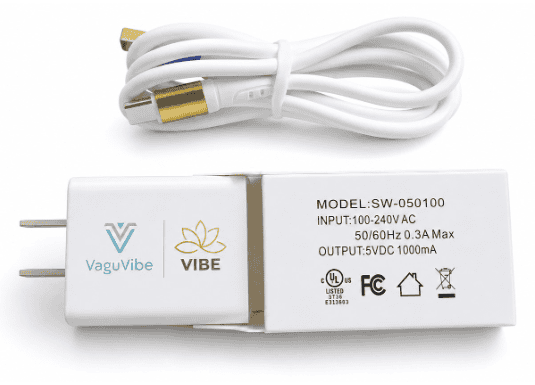
The cable is the part people overlook, and it's the one we'd most like you to keep.
One thing worth knowing: damage caused by an incompatible adapter isn't covered under warranty. It's the easiest repair bill there is to avoid — just ask us first.
The universal advice. Using only the charger and cable that came with a device is the most consistent instruction in every published lithium-battery guide — the National Fire Protection Association, the U.S. Fire Administration, and UL's Fire Safety Research Institute all say it in nearly identical words.
2
Don't put it away empty
This is the one most people have never heard, and it's the most important habit on this page.
The most damaging thing you can do to a lithium battery is leave it sitting empty for a long time. A battery that goes into a drawer with nothing left in it keeps quietly draining, and after weeks or months it can fall to a level it never fully comes back from. The damage isn't dramatic and you won't see it happen. You'll just find, one day, that the device doesn't hold a charge the way it used to.
So: if you're setting your device aside for a while — travel, a break, a change of season — charge it first. If it's going to be a long stretch, top it up every few months.
Apple tells its customers the same thing. Their guidance for iPhones, iPads, and MacBooks warns that a device stored with a fully discharged battery can fall into a deep discharge state and lose the ability to hold a charge. Apple — Maximizing Battery Performance
3
Leaving it on the charger is fine
There's a widespread belief that keeping a device plugged in ruins the battery. It doesn't. Sitting at a full charge for years may shorten battery life slightly, but the effect is small and gradual — nothing like the harm of storing it empty.
If you're ever choosing between the two, choose the charger. Between sessions, the charger is a perfectly good place for your device to live. Take it off whenever you want it; put it back whenever you don't.
Charge as often as you like. Daily use with a nightly charge is exactly what these batteries are built for.
Why we mention it. These two habits are easy to get backwards. If you remember one thing from this page, remember the order: leaving it empty is the real risk, and leaving it charged is not.
4
Take it with you — and never leave it in a parked car
Your device is meant to be with you: worn, in your bag, or sitting out where you can see it. It isn't meant to be left somewhere on its own for long stretches, and a parked car is the worst version of that.
The same rule you follow for children and pets applies here. Interior car temperatures climb far higher than most people expect, well beyond anything a lithium battery is built to sit in. That kind of heat degrades the battery permanently, and it does not recover. A device that spent one summer afternoon in a hot car is never quite the same again.
There's a second reason, and it's the one fire officials care about. Every lithium battery ever made carries a small chance of failure — the NFPA puts it plainly: like any product, a small number of these batteries are defective, and they can overheat or catch fire. That's true of the battery in your phone and the battery in ours. It's why the standing advice from fire authorities is not simply keep batteries cool, but keep them away from anything that can burn, and don't leave them running unattended.
Put together, the habit is a simple one:
Don't leave any lithium device sitting unattended on something flammable. Not on a car seat, a couch cushion, a bed, a pile of clothes, or a stack of papers. A hard surface in the open — a table, a nightstand, a shelf — is all it takes. And when you leave the car, bring the device inside with you.
What fire officials advise. The U.S. Fire Administration recommends storing lithium-ion batteries away from anything that can burn, and keeping them out of direct sunlight and out of hot cars, which it describes as a fire risk. The NFPA, the Consumer Product Safety Commission, and state fire marshals publish the same guidance for every lithium device you own. U.S. Fire Administration — Battery Fire Safety
5
Be gentle with cables, and charge on a hard surface
Most of the cable damage we see comes from people pulling on the cord itself. When you plug in or unplug, grip the connector between your thumb and forefinger and pull straight out. Never yank the cable.
And whenever your device is charging, set it on a table or nightstand — never on clothing, bedding, a car seat, or a boat seat. Soft surfaces trap heat around the device while it charges, and heat is the one thing a battery never forgives.
Same rule for your phone. Fire officials give an identical instruction for phones and laptops: charge on a hard surface, never on a bed, couch, or pillow. UL Fire Safety Research Institute — Take C.H.A.R.G.E. of Battery Safety
6
If it gets wet, skip the rice
Rice is the first thing everyone tries, and it's the one thing that definitely won't work. Your device has ventilation openings over the coils, so water gets in deep, and a bag of rice isn't powerful enough to draw it back out.
Letting it air-dry on its own doesn't work either. Water sitting inside will corrode the circuit board, and that happens fast. You want the water driven out, not slowly evaporating.
Use a hair dryer on its cool setting — no heat. Hold it a few inches away and keep it moving across the device, paying attention to the vents. Give it twenty to thirty minutes. It's the moving air that carries the water out, not warmth, and a wet device is the last thing you want to add heat to.
Don't charge it until you're confident it's completely dry. If you're not certain, contact us first.
Why cool air. Drying works by carrying vapor away from the surface, which is a function of airflow. Heat only speeds that up — and around a wet circuit board and a lithium battery, it isn't a trade worth making. It can also soften the plastic housing.
This goes for everything you own
Habits 2 through 5 aren't really about our devices. They're about lithium batteries, and you are surrounded by them:
- Your cellphone
- Your laptop or tablet
- Your wireless earbuds
- Your Bluetooth speaker
- Your smartwatch or fitness tracker
- Your portable power bank
- Your cordless vacuum and power tools
- Your e-bike or scooter
Every one of those runs on the same chemistry as the battery in your Resona Health device, and every one of them is covered by the same guidance: don't store them empty, don't charge them on a soft surface, don't leave them in a parked car, and don't leave them sitting unattended on anything that can burn.
Same battery chemistry, same habits.
Where this guidance comes from
- U.S. Fire Administration (FEMA) — Battery Fire Safety
Federal guidance on storing and charging lithium-ion batteries at home. - National Fire Protection Association — Lithium-Ion Battery Safety
Consumer safety tips covering chargers, temperature, and storage. - UL Fire Safety Research Institute — Take C.H.A.R.G.E. of Battery Safety
A public education campaign from UL Research Institutes. - Apple — Maximizing Battery Performance
Manufacturer guidance on charging and long-term storage of lithium batteries. - U.S. Consumer Product Safety Commission — Lithium-Ion Battery Safety
Federal consumer information on lithium-ion batteries in everyday devices.
That's it. Six small habits that will keep your device working the way it should for years.
If you have questions, or if your device isn't holding a charge the way it used to, our team will take care of you.
Contact supportTo your health,
Mark Fox
Founder, Resona Health
These statements have not been evaluated by the FDA. Resona Health products are general wellness devices and are not intended to diagnose, treat, cure, or prevent any disease. Individual results may vary.